First, we need a backup operating system before using a single key (if you have a mirror file, of course, you can skip this step) and click on the backup button, at which point the backup operation will be completed since the computer restarts, and the backup may take a little longer, in the order of 10 to 20 minutes, with patience
Second, we can do a one-click return operation when we're back up. At this point, when we turn on the software again, we can see that the one-key reduction button has been changed from grey to optional, and that the user can complete the restoration system with just a little bit, mainly by introducing you to the ghost-based restoration
Iii. We also need to export back-up mirror files, open tools to click to export, assign folders, and then click to make sure before we return to the ghost key
Iv. Restart the computer, select the ghost key (as you can restart the computer when you select ghos in the software panel) and then go all the way to the enter key, we come to the main ghost menu, and we choose ghost 11. 2 (a different version of the ghost tool might be different)
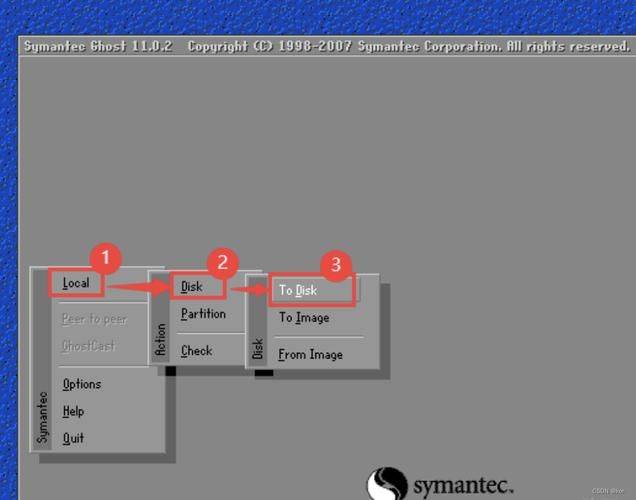
V. Move the cursor to the local option, click enter, then select partition options, and click enter. Then choose the fromimage option to enter the gho file selection interface. If you cannot operate with the mouse, you can use the keyboard to confirm the selection
6. We select the directory that just backed up the gho file, which contains information that may sometimes differ from the name of the disk we normally use, such as the original f drive, which may become the e drive, and when making the selection, be careful to see if it is the one you want to choose
Vii. After the selection, the enter key completes the one key correction. The default installation catalogue is c. If you want to install a system file that is not c, you need to select a disk to ensure that the information is backed up before the system is restored。