Traditional remote login or file transfer methods, such as telnet, ftp, which use explicit data transmission, have many security risks。
With the emphasis on cybersecurity, these approaches are slowly becoming unacceptable. The ssh protocol provides secure access and other secure network services in an unsafe network environment through encryption and authentication of network data。
As a security alternative to telnet and other unsafe remote shell protocols, ssh protocols are now widely used worldwide and most equipment supports ssh functionality。
01
Ssh port number
The default ssh port is used when ssh is applied to steelnet, sftp and scp。
When ssh is applied to netconf, you can specify that the ssh port is 22 or 830. The ssh port supports changes, all current connections will be disconnected and the ssh server starts intercepting the new port。
02
How does ssh work
Ssh, consisting of servers and clients, will go through the following stages throughout the communication process to establish a secure ssh channel:
1 connection created
The ssh server intercepts the client's request for connection at the specified port, and a tcp connection is established after the client has initiated the request for connection with the server。
2nd edition consultation
The ssh protocol currently exists in ssh1. X (pre-ssh2. 0) and ssh2. 0 versions。
Ssh2. 0 the ssh1. X agreement has been expanded in structure to support more authentication and key exchange methods, while improving service capacity. The ssh server and client determine the final ssh version number by consultation。
3-calculations consultation
Ssh supports many encryption algorithms, according to which the parties negotiate key exchange algorithms that are ultimately used to generate a key for a session, encryption algorithms that are used to encrypt data information, public key algorithms that are used for digital signatures and authentication, and hmac algorithms that are used for data integrity protection。
4 key exchanges
Servers and clients create encrypted channels through key exchange algorithms that dynamically generate shared session keys and session ids。
The session key is primarily used for encryption of subsequent data transfers. Session id is used to identify the ssh connection during authentication。
5 user authentication
Ssh client initiates authentication requests from the server end, which authenticates the client。
Ssh supports the following types of authentication:
Password (password) authentication: client authentication via username and password, encrypted username and password sent to the server, decrypted by the server against locally stored username and password, and returned to the client the authentication success or failure message。
Key (publickey) authentication: the client authenticates with the server through information such as user names, public keys and public key algorithms。
Password-publickey authentication: indicates that the user needs both password and key authentication to be able to log in。
All authentication: as long as one of the passwords and key authentication is satisfied。
6 session requests
Following the certification, the ssh client sent a session request to the server's end requesting some type of service, i. E. A session with the server。
7 session interactive
After the session is created, the ssh server and the client interact with the data information on the session。
03
Use putty and openssh
Putty is a classic free ssh connection tool on windows, usually used for remote login devices using ssh protocols, the latest version of which can be downloaded on the putty official network。
Openssh is the open source of the ssh protocol, which supports running on the unix operating system. The latest version can be downloaded on the openssh official network。
Windows10 now contains openssh client and server software that can be searched for in settings-applications-applications-functions-options。
1ssh key symmetrically and asymmetrically encrypted: the basic way to enhance security is encryption, and encryption algorithms are used to secure the transmission of the message by converting it into a secret. Ssh uses a combination of symmetric encryption and asymmetric encryption algorithms in the course of its work to secure the transmission of information by pre-generated ssh keys. The decryption of two encryption algorithms is illustrated below:
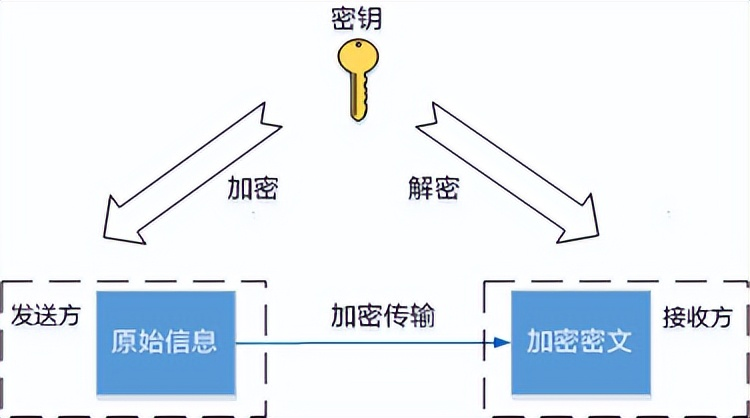
Symmetric encryption algorithm
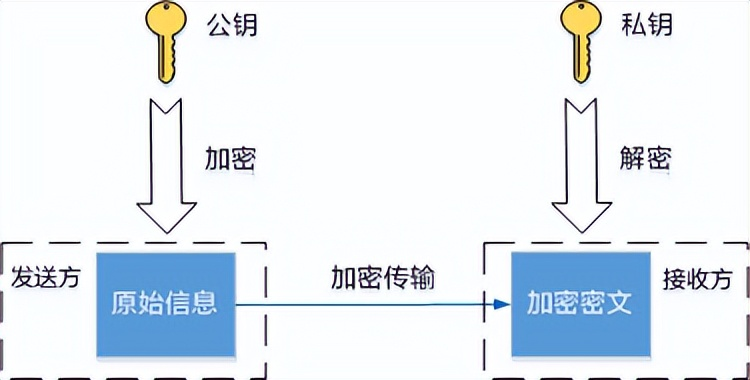
Asymmetric encryption algorithm
Symmetric encryption algorithms use the same key to encrypt and decrypt data。
The session key generated during the ssh connection is the symmetric key, which is generated by the client and the server depending on the shared portion of the information and the respective private data using the key exchange algorithm。
Because symmetric encryption algorithms are rapidly decrypted, they apply to the scene of the transmission of a large amount of data。
Sending and receiving asymmetric encryption requires a pair of associated ssh keys, public key and private key. The private key is held by the generated party itself and the public key may be sent to any other person requesting the communication。
The sender encrypts the contents of its communication with the received public key, and only the recipient can decrypt the contents of the communication with the private key。
The private key for asymmetric encryption does not need to be exposed to the network and is significantly more secure, but the decryption is much slower than the symmetric key。
Asymmetric encryption is used for two phases of the ssh connection. One is during the key exchange phase, both the server and the client generate their own temporary public and private keys to calculate the same session key for subsequent encrypted communications。
The other is to verify the identity of the client through the client's private key to the public key at the user authentication stage, using the feature that only a matching private key can decrypt the content of the public key。
2 key authentication
The two most basic modes of ssh user authentication are password authentication and key authentication. Password authentication is a simple way of sending its own username and password to the server for authentication, and each login requires a username and password。
Key authentication uses a public key private key to authenticate and secure secure secure access, which is widely used and recommended。
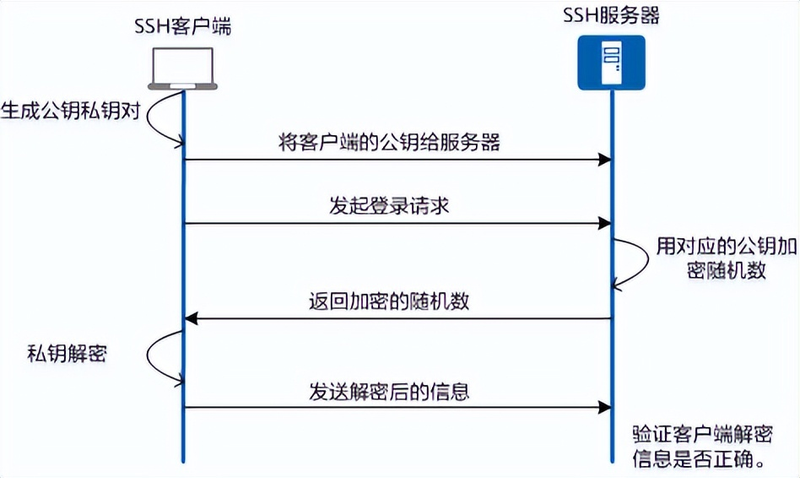
The underlying principle of key authentication is that the server uses the client's public key to encrypt random content, and the client uses its private key to decrypt and sends it to the server to confirm its identity。
The process is illustrated below: