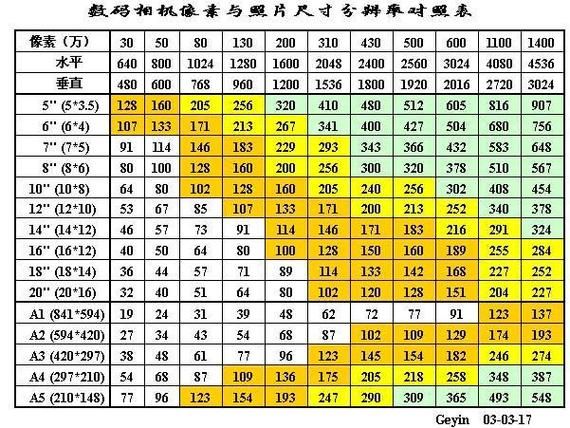
Digital photo print-out scale matching table and description
Published: photo processing network,** source: photo processing network, 1963 people are following the subject
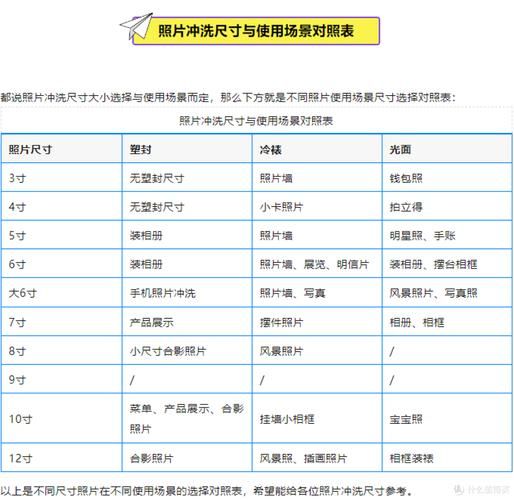
Digital cameras are becoming more popular, and the associated industry -- digital photo wash shops -- is opening more and more. But do you know what to do before you're happy with the digital photos you've taken
The digital cameras produced at this stage, although for the most part they have a resolution of more than 3 million pixels (resolution) is sufficient to print photographs of 3r or 4r sizes. However, basic issues such as photo quality and cut-off ratios, the protection of storage cards, and instructions given to the staff of the print shop, which many users ignore when flushing, may have an impact on the print-off of digital photographs. That's why the photos that are printed out will be much better if we're prepared to do it。
*** common sense: it is usually stated that photo specifications are expressed in inches, and that products such as monitors are expressed in sizes different from the length of the diagonal line, and “inches” in photographs refer to the length of one side long. For example, a 6-inch picture is a 64-inch picture. At the international level, there is also a common method of showing the size of photographs, i. E. Taking inches of integer values from the short side of the photograph plus the letter r. For example, a 6-inch photograph, with a 64-inch specification, or 4r. ***
I. A digital printout reference。
In order to save storage card space, most digital cameras provide multiple photo-mass for user choice. The main groups are best (best quality), good (good quality) and normal (general quality). The difference is to compress the following jpeg photographs to varying degrees. But over-compression can seriously affect photo-printing quality. So the photos of the latter two are not really suitable for printing. Before taking photos to print, it is advisable for users to check whether the photo quality after printing is proportional to the video files taken. In order to ensure satisfactory printing, you may refer to the table below。
Print size (inch) file volume (approx.) requires minimum resolution photo corresponding dimensions
(1 inch/2) 150-200 kb640 x 480 (300,000) 2. 5. 5 cm/533. 5 cm
(53. 5 inches) 3r500-550kb1280x960(1. 2 million)12. 708. 89 cm
(64 inches) 4r600-650kb1280 x 1024 (1. 3 million) 15. 2410. 16 cm
(75 inches) 5r800-900kb1600x12 million 17. 7812. 70 cm
6r1-1. 2mb1900x1280 (2. 4 million) 20. 3215. 24 cm
(108 inches) 8r-8f1. 3-1. 5mb2048 x 1536 (3 million) 25. 4020. 32 cm
Note: see table 2 for other dimensions
The above figures are the most basic requirements, and the higher the quality of the photographs and the greater the documents, the better the impact of the prints. If users are to print digital photographs on a regular basis, it is advisable to check whether they meet the above requirements. The author's personal suggestion was to use “best quality” as much as possible to reduce the loss of photo detail and ensure that the printout worked well。
In addition, users can calculate the correct digital photo output size based on the following formula。
Film resolution 300dpi = output size
For example, assuming that the photograph taken was 1. 5 million pixels (1024 x 1536), the 1024 and 1536 were divided by 300 to 3. 5 inches (i. E., 3r dimensions). In other words, the maximum limit for digital photo prints of 1. 5 million pixels is 3r, and so on。
References:
Recommended pixels for 4r photos:
I. 2 million pixels can already print more understanding photos
Ii. 3 million pixels is a good option, which is to guarantee pixels
Iii. 4 million and 5 million pixels
Iv. Larger pixels don't have much effect on the quality of printing (too big for you, too, in the washroom), but the file size will be large if the camera memory card is adequate and
The computer hard drive is big enough to use the highest pixels that the camera can shoot.
Ii. Spanning ratio of photographs
Owing to the size limits of the ccd sensor, the width ratio of most digital photographs is 4:3 while the general ratio of 3r photographs is 5:3. 5 and 4r is 3:2. If they are printed proportionally, the picture will be printed with white edges or parts cut off. Some people say that i can pre-empt the wide scale of photographs on computers, but i don't recommend it because it takes time. These problems can be avoided by providing five to eight spaces at the edge of the image at the time of the shoot。
Of course, if you feel more accurate about cutting your own picture, the protoshop-enabled cropcrop cut-off tool that's inside the graphic editing software can help you. Just enter the appropriate ratio in the tool option, e. G. 3. 5 inches by 5 inches, and the tailoring tool will cut the photo according to the ratio provided by the user。
As far as i know, there are now a number of washrooms where digital camera currents can be printed in 4:3 photos, i. E., without cutting, which are actually 6x4. 5 inches (15. 2x11. 4 cm), as opposed to 4r photographs without cutting: 3 is called 4d sizes, and correspondingly has a match distribution/sale corresponding to 4d sizes. More information is available on the actual size and price of the studio where you are, which can be washed before washing. Here you can refer to the price of local prints: 4d over 4r is a dime of 4d light: 8 n. D., 9 n. S., 4d light face + swirling = 1 p. P., and prices vary from place to place。
Iii. Software fixation of photographs
The proper use of software to adjust the brightness, contrast, contrast and colour colour of the photographs before they are handed over to the print shop or printed directly using printers has contributed to their considerable appreciation. The author has a small technique of using “leves” (ctrll) in the photoshop to fix the sides to the hestogram end, with significant improvements in the brightness, contrast and overall tone of the photo. In addition, you can choose autoleves or autocolor, and it can help with image quality and color adjustment。
Clear instructions for print shop
In general, digital laser print shops automatically adjust photo brightness and cmyk four-telemetry with computers. Users can learn from the code behind the washed photo whether the photo was coloured by the print shop, and if the words “nnnn” appear, it means that the printer does not feel the need to adjust. In general, however, appropriate colours help to provide the visualization of photographs。
Schedules
Maximum size comparison for photo prints
Maximum size table for digital cameras and printable photographs provided
Data comparison of digital cameras based on 150 ppi that can wash the largest photographs (in)
Five million pixels are effective 4915200, 2560 x 1920. Photo size 17x13 can be washed, 21 inches across
Four million pixels are valid 3871488, and pixels 2272x1704. Scratch photo size 15x11, diagonal 19 inches
3 million pixels are valid 3145728, 2048x1536. 14x10, diagonal 17 inches
Two million pixels are valid for 192,000, and 1,600 x 1200 pixels. Photo size 11x8, rinsing 13 inches
1. 3 million pixels are active 1228,800, 1280 x 960. We can flush photos 9x6, 11 inches across the corner
800,000 pixels are valid 786432, 1024x768. We can flush the photo size 7x5, 9 inches
500,000 pixels are effective 480,000, 800 x 600 pixels. We can flush photos 5x4 with a 7-inch diagonal
300,000 pixels are 30720, 640 x 480 pixels. Photo size 4x3 can be washed, 5 inches across
As can be seen from the table above:
Five inches (35), 800 x 600 resolution
6-inch photo (46) with 1024 x 768 resolution
7-inch photo (57) with 1024 x 768 resolution
8-inch photo (69) with 1280 x 960 resolution
Photo size: table 2
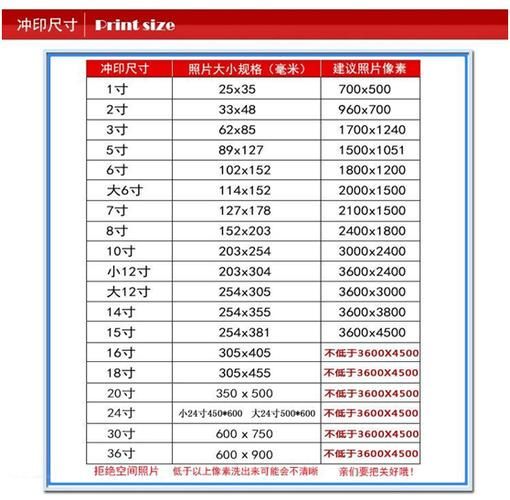
11. 5 inches: one inch 2. 53. 5 (cm); one small inch 2. 23. 2 (cm); one large inch 3. 34. 8 (cm) i'm not sure
1. 52 inches: 2 inches 3. 54. 9 cm; 2 inches 3. 54. 5 cm; 2 inches 3. 55. 3 cm
1 inch 1 r 2. 63. 7 (cm)
2 inches 2r 6. 38. 9 cm
53. 5 (5 in 3r) 12. 708. 89 (cm) i'm not sure
64 (6 inches 4r) 15. 2410. 16 (cm) i'm not sure
75 (7 inch 5r) 17. 7812. 70 (cm) i'm not sure
86 (8 in 6r) 20. 3215. 24 (cm) i'm not sure
108 (10 inches 8r) 25. 4020. 32 (cm) i'm not sure
1210 (12 inches) 30. 4825. 40 (cm) i'm not sure
1412 (14 inches) 35. 5630. 48 (cm) i'm not sure
1612 (16 inches) 40. 6430. 48 (cm) i'm not sure
1812 (18 inches) 45. 7230. 48 (cm) i'm not sure
1814 (18 inches) 45. 7235. 56 (cm) i'm not sure
2016 (20 inches) 50. 8040. 64 (cm) i'm not sure
2018 (20 inches) 50. 8045. 72 (cm) i'm not sure
2420 (24 inches) 60. 9650. 80 (cm) i'm not sure
3024 (30 inches) 76. 2060. 96 (cm) i'm not sure
3224 (32 inches) 81. 2860. 96 (cm) i'm not sure
3624 (36 inches) 91. 4460. 96 (cm) i'm not sure
4032 (40 inches) 101. 681. 28 (cm) i'm not sure
4232 (42 inches) 106. 681. 28 (cm) i'm not sure
4832 (48 inches) 121. 981. 28 (cm) i'm not sure
Various document dimensions: table 3
1. Identity card (22 mm32 mm)
Driving permit (22mm32mm)
3. One inch black and white (22mm32mm)
4. Color 1 inch (27mm38mm)
Large colour inch (40mm55mm)
6. Common document (33mm48mm)
7. 1 inches (25mm35mm)
8. 2 inches (35mm49mm)
9. 3 inches (35mm52mm)
10. Hong kong/australia pass (33mm48mm)
11. Visa to the united states (50mm50mm)
12. Japanese visas (45mm45mm)
13. 2nd inch (35mm45mm)
14. Passport (33mm48mm)
15. Photos of graduates (33mm48mm)
16. License (21mm26mm)
17. Car licence (60mm91mm)
Additional items:
While most printing shops carefully keep customer storage cards, in order to avoid the loss of photographs, it is recommended that each copy be backed up. If you have a cd-rw or dvd writer, it would be preferable to place different sizes of photos in separate folders and to hand them over to the print shop in cd-r, which would help to reduce opportunities for human damage or accidental breakdown of storage cards。
At the same time, most digital laser-printing shops, after printing photos, typically delete the customer's files to protect your privacy. If it's not deleted, you can ask the photo shop to do it。
First point: cutting
Questions were raised about the 200/300/400/5 million pixel digital camera photographs, the adequacy of the *r-band and the maximum extent to which it could be washed. It's a hard question to answer in a moment, but at least you have to figure out what kind of specification is for rinsing a digital photo
In general, the majority of digital cameras have 4:3 specifications (a few have 3:2 outputs). It is clear that if the original image of the digital camera is not prints 4rs, it is automatically cut, and the object of the cut, which is “top and bottom”, is either symmetrical cutting from the center, multiple cutting or multiple cutting, depending on the master of the operating machine。
As the vantage chart shows, the most appropriate cut is the foot cut, but who knows when it's washed? So if you're going to have to send out a flush, it's not 4r, it's best to cut it in advance。
If it wasn't for the 4rs, it'd be easier to cut yourself in the face of all the weirdness。
Second point: resolution
Is 2 million enough? 3 million? Such questions are difficult to answer. In general, the optimal print-off effect of digital printing requires that the original data file guarantee at least 200 dpi resolution; the better effect requires 160 dpi; or at least 120 dpi if it is a bottom line. If you keep it down, it's already clear that sawn teeth and plugs are blurred. See visibility resolution requirements in the table below。
Third point: color
It is often said that rinse photographs does not have the same color effect as i see on the calculator or digital camera. Well, the problem is too complex, and the industry has put in place a number of colour criteria to try to solve it, but so far there is no perfect solution. In short, it is difficult to say that the effects of the same pp on both monitors are consistent, even if they are washed up. In order to try to be consistent, we can try to be close by the following points。
(a) tell the rinse master not to adjust my pp
B) adjusts its monitor (with rice to replace a higher-level monitor to ensure that the colour is back on)。
(c) maintaining a rinsing shop to wash the pp so that the colour features of the rinsing machine can be more easily captured (colored) so that they can be matched when they are processed later
Iv. Impact of resolution at shooting
The greater the resolution, the higher the accuracy of the images, the greater the resolution is used as far as possible for filming, which is an erroneous perception among many digital camera users. Theoretically, high-resolution can provide high-precision images, but digital photographs are to be recorded as image files, and as the resolution increases, the image files will increase and the time for digital cameras to process the images will increase. The higher the resolution is used, the more processing time it takes to film, the larger the storage space it takes to film. The size of the memory device is limited when a digital camera is used, and the higher the resolution used, the smaller the number of sheets that can be taken. In addition, because of the length of the processing, the use of excessive resolution in the capture would risk missing a good shot. A720 is
Even if you do not care about the wasteful storage space and the increased processing time, the choice of resolution should be limited to sufficient; otherwise, when you do later processing, you will find that the image taken with higher resolution is reduced to a lower resolution using software, with almost the same visual effect as the image taken directly with lower resolution, and that the latter image appears to be more acute。
[it is only appropriate to consider, in selecting cameras, the size of the area of light, the light technology used, the optical quality of the lens, etc., in combination, not simply high or low issues. Once the camera is selected, unless, in pursuit of speed, the large-capacity memory card is already very cheap today, it is natural to use its maximum resolution, first, the camera itself is designed for this resolution, and second, it allows for greater post-treatment space] online energy a720 is
V. Choice of resolution at shooting
At present, most digital cameras have several levels of resolution to choose, and how can the choice be made? The use of post-pornography images is the main reason for the choice of the level of resolution to be taken. If digital photographs are used only for web site production, then there is no need for too high resolution, and if they are displayed only on monitors, it must be remembered that the image pixels and display settings are reciprocal. So if you want the full screen of the image to be on the standard 640480 pixel display, all you need is an image of 640480 pixel. If the screen display is set at 1280960 pixels, the image of 640480 pixels will only cover half of the space on the screen. It is not necessary to take into account the number of pixels per inch, and the monitor only cares about the number of horizontal and vertical pixels。
If your digital photo will be used for printing, you need to remember that screen displays and printing, printing, are different. You need to understand the two terms and remember the relationship between them. Image resolution is the total pixel number of images (ppi), in ppi. The quality of the output of the image is determined by the output resolution of the image, which describes the number of points (dpi) per inch that can be generated when the device is exported. The two are related but not equal, "image resolution output resolution = image output size". In the case of magazine printing (http: \\/bbs. Photops \\/thread. Php? Fid=62"\t " blank" ), the lowest output resolution requirement is 300 dpi, and 16 full pages require approximately 342400 resolution
Print size and photograph parameters
The digital print-off system currently provides you with 10 different types of print-off services of up to 1 inch size and up to 16 inches size。
To get a good picture, the digital camera is better effective than 3 million pixels, while digital photo resolution is required. In general, there is a simple method of calculating how much resolution digital photographs are suitable for print-off, with a resolution of 16001,200 digital photographs, which is calculated by 1600250 = 6. 4 rounded to 6 inches, so you can multiply 6 by 250, so that the resolution of option 16001200 is more appropriate。